


Free fonts Download

Feature Post
-

GL TinTin HD 1.0.1 Retail S^3
Explore the exciting and dangerous world. -
Hall of Fame Games of Symbian^3
Hall of Fame Games of Symbian^3 -

SPB Mobile Shell v3.8.944 S60v5 S^3
SPB Mobile Shell v3.8.944 S60v5 S^3 New Version Build! -

Plants vs Zombies s60v5 S60v5 S^3
A mob of zombies is about to invade,and your only defense is an arsenal of zombie-zapping plants -
Angry Birds Rio v1.40 Smugglers Plane S^3
The latest Angry Birds Rio update, features the exciting beginning of Smugglers’ Plane! -
SPB Software SPB Shell 3D v1.1.2327 S^3 Anna Belle Signed
SPB Shell 3D introduces the next generation user interface for Symbian -
RovioMobile Angry Birds Seasons Wreck the Hall 2.1 S^3
It's the most wonderful time of the year, but the pigs are up to their usual tricks! -
Draw War Save Yer Booty 1.01 S^3
Help Captain Goodthrow save his buried treasure from those darn Vikings in this engaging comical game where line draw mechanics meets tower defense -
Miniclip SA iStunt2 v1.00
Hit the slopes for some serious shredding in the most fun snowboarding game ever created -
Miniclip SA Fragger v.1.00 S^3
The world of is at risk, and he needs your help to explode all enemies! -
TTPod v4.40 Final S60v5 S^3
Everyday sounds is a powerful, completely free cell phone music player software,support lyrics and songs to download pictures... -
EA Mobile The Sims 3 HD v0.0052 S^3
EA Mobile The Sims 3 HD v0.00(52) Symbian^3 New Version -
AngryBirds Magic v1.1.0 S^3
Well, Rovio, the developers of Angry Birds, are betting that Angry Birds will be even more fun when played with friends. “Angry Birds Free with Magic” will come..


Free-Fonts-Download
Showing posts with label keyboard. Show all posts
Showing posts with label keyboard. Show all posts
Paragon Handy Guard v1.01.440 S60v3v5 S^3
Symbian S60 v5 [i8910HD/5800/N97/Mini/X6] Apps
Symbian^3 [N8/C7/C6/E7]
Symbian^3 Anna Bella Symbian OS 9.1/9.2/9.3 (3250,5500,E50,E60,E61,E90,N71,N73,N80,N82,N91,N92,N93,N95,N85,N96) Apps

Handy Guard is an efficient smartphone protection utility with hi-end functionality. Safeguard your phone, any data and access to applications just keeping one password in mind. Use invisible SMS commands to lock a device and wipe private information in case your phone was lost or stolen. Handy Guard is definitely a guard you can rely on.
Handy Guard:
Secures general access to your smartphone.
Protects any stored information (contacts, messages, notes, settings, images, videos, etc.) from unauthorized use.
Provides password access to any selected applications.
Sends an alert SMS to alternative phone number in case of false access attempts.
Locks your device when SMS lock command is received.
Deletes your confidential information when remote SMS wipe command is activated.
Employs just one secured password (strong encryption) for all protection functions enabled

Download to PC Clickshere
Alternatehere
Melon Security Lock v2.8.118 S60v3 S60v5 S^3
Symbian S60 v5 [i8910HD/5800/N97/Mini/X6] Apps
Symbian^3 [N8/C7/C6/E7]
Symbian^3 Anna Bella
Symbian OS 9.1/9.2/9.3 (3250,5500,E50,E60,E61,E90,N71,N73,N80,N82,N91,N92,N93,N95,N85,N96) Apps

Be smart. Be safe.
Security Lock (SL) is the best mobile solution against theft and unwanted access to your phone. This quality application offers unbeatable value for money, giving you the power to protect the important information and personal data on your phone even remotely.
Reasons why Security Lock is a must-have app:
1. With SL you can stop curious friends or intruders from spying on your phone.
How: Lock your phone with a password code.
2. With SL your phone remains protected even if someone restarts your device or changes the SIM card.
How: Enable the lock at power on or on SIM change setting.
3. With SL, you can expose a thief by activating a loud alarm.
How: Set the remote-activation alarm.
4. With SL, you can defend your valuable information if your phone is lost or stolen.
How: Activate a remote information wipe command via SMS and delete your sensitive data.
5. With SL, you can hide your confidential or sensitive data from everyone.
How: Store all files you want to keep secret in Security Lock’s password-protected storage.
6. It’s as smart and secure as an app can get.
What's New in This Release:
· Activation bug fix
Requirements :
» S60 3rd Edition Devices[B]
» S60 5th Edition Devices
» Symbian^3 Devices / Anna / Belle
Download to PC Clickshere
Alternatehere
SPP SlideUnlock v4.0.8 Full S60v5 S^3
Symbian S60 v5 [i8910HD/5800/N97/Mini/X6] Apps
Symbian^3 [N8/C7/C6/E7]
Symbian^3 Anna Bella

SlideUnlock (S60 5th S^3 special sliding unlock) is added to unlock a cell phone and desktop shortcut enhancements to the software, he not only has a wealth of Canadian unlock methods, but also the gorgeous interface DIY extensions, is that you both enjoy more than IPhone, Win.dows Phone and other mobile phone to unlock more energetic effect of the sliding, but also unconventional.
A variety of keys, cell phone sensor function can play in this software, plus unlock features are fully used, is that you can do can be done without touching plus unlock mobile phones.
Support Devices :
» S60 5th Edition Devices
» Symbian^3 Devices / Anna / Bell
Download to PC Clickshere
Alternatehere
Rovio Mobile Angry Birds v1.63 Symbian^3 Signed
Symbian S60 v5 [i8910HD/5800/N97/Mini/X6]Games
Symbian^3 [N8/C7/C6/E7]
Symbian^3 Anna Bella
Angry Birds for Symbian^3 (v1.6.3)

The survival of the Angry Birds is at stake. Dish out revenge on the green pigs who stole the Birds' eggs. Use the unique destructive powers of the Angry Birds to lay waste to the pigs ’ fortified castles.

Angry Birds features challenging physics-based castle demolition, and lots of replay value. Each of the 288 levels requires logic, skill, and brute force to crush the enemy.
Protect wildlife, or play Angry Birds!

Download to PC Clickshere
Download to PC Clickshere
Alternatehere
Nokia Beta Labs Swype Pen Input v2.1.1332 S^3
Symbian S60 v5 [i8910HD/5800/N97/Mini/X6] Apps
Symbian^3 [N8/C7/C6/E7] 
What's New
A long awaited update to Swype for Symbian is now available. We’ve taken your feedback from our first Beta, incorporated several cutting edge features currently available in Android, and come up with our best input solution yet for Symbian.
We’re still putting the final touches on Swype for Symbian 2.0, but we’re giving our Beta Labs user a sneak-peak. Download Swype for Symbian 2.0 Beta now to check out these exciting new features:
ChangeLog:
- Portrait and split-screen support for devices with Symbian Anna
- Cutting-edge predictive tap auto-correction engine
- 30 downloadable language dictionaries
- Many incremental UX changes based on Nokia and Android Beta Labs feedback
- Hundreds of bug fixes. Too many to list!
S60v5
Download to PC Clickshere
Alternatehere
S^3
Download to PC Clickshere
Alternatehere
Anna S^3
Download to PC Clickshere
Alternatehere
Harald Meyer HWKeyv1.00(0) S60v3 S60v5 S^3
Symbian S60 v5 [i8910HD/5800/N97/Mini/X6] Apps
Symbian^3 [N8/C7/C6/E7]Symbian OS 9.1/9.2/9.3 (3250,5500,E50,E60,E61,E90,N71,N73,N80,N82,N91,N92,N93,N95,N85,N96) Apps

With HWKey you can start any program with your hardware camera button. HWKey can be optionally auto-started when you turn on your phone
Download to PC Clickshere
Alternatehere
Spp_nokia SlideUnlock v3.10(0) S60v5 S^3
Symbian S60 v5 [i8910HD/5800/N97/Mini/X6] Apps
Symbian^3 [N8/C7/C6/E7]
SlideUnlock (a sliding unlock tools) enhances your S^3 and S60 5th device with screen lock and unlock features, utility shortcuts on the lock desktop. It not only has different kind of unlock methods(keys, sensor), but also the gorgeous interface, DIY extensions. With energetic effect of the sliding, even unlock without touching, let you enjoy more than iPhone, Android phone and others.
Features:
* Modify the automatic locking conditions, only the idle screen or slide to unlock automatically set the lock time of the effective interface;
* Plus unlock sound effects to replace the default comparison for the more three-dimensional music section, low-key and calm feeling to experience better;
* Modify the long press red button to unlock, or sometimes white keys to unlock the hidden situation caused by sliding interface, QQ front click directly to the problem;
* To increase the skin background can select "Sync theme background" feature, use the sliding interface background and cell phone standby current theme has been the skin, this mode of operation principle of the more savings deposits, after all, do not call an at least 360 * 640 image into.
* On the terms set some items were considered and adjustments easier to understand operation.
* Revise and improve the 1.18 release most of the problems since all feedback and suggestions.
* Installer integrates four sets of classics in the default skin. In which the skin of a new pirate (User sea ghost design - blue perspective - recording all his works).
Chang Log:
1, strengthening both Symbian^3 system type of perfect adaptation, increase the desktop shortcut icon a key locking function, long press icon to adjust position.
2. Increased Winp7, Anna, android, Iphone, the different style such as skin effect. The more practical software.
3. New power key directly to unlock function. Slide to unlock state shielding power key shutdown, perfect adaptation C6, etc type use.
4. Add slide to unlock in no operation circumstance 8 seconds, automatic locking screen more energy-efficient.
5. Fixed many problem that people feedback
NOTE:It is the offical free version,Updata is 2011-05-31!
Support languages:EN CN
Download to PC Clickshere
Alternatehere
Digitalfootmark Lock Screen BETA v0.18(4220) S60v5
Symbian S60 v5 [i8910HD/5800/N97/Mini/X6] Apps
Symbian^3 [N8/C7/C6/E7]
The application improves the lock screen feature greatly in Symbian devices. It works in virtually all S60 phones, from S60 3.0 to the latest models including N8.
Currently it has the following features:
* Show the current time and date
* Show the battery status
* Show missed calls
* Show unread messages and emails
* Show GPS, Bluetooth, WLAN and USB indicator
* Show upcoming calendar entries
* Disable blank screen in touch phones
* Unlock the phone with touch swipe
* Auto start in boot
Changelog:
New version has been now released.This will be 'beta' for some days. If any major errors will be found, quick fixes will be made.
- analog clock
- power management is slightly better, but still there no ability to e.g. control the display lights
- headset indicator (only in Ovi Store version for S60 5.x devices)
- small corrections here and there
- build numbering is now changed (now it is directly based on the build date)
Download to PC Clickshere
Alternatehere
July Player v1.60 s60v5
Symbian S60 v5 [i8910HD/5800/N97/Mini/X6] Apps
Symbian^3 [N8/C7/C6/E7] 
Main features:
* providing both file manager and video manager with friendly UI
* support rm, rmvb,webm, avi, mp4, 3gp, mp3,flv, asf....
* support srt subtitle encoded with unicode or utf-8
* rotate, zoom, scale of video with easy key access
New features on plan,we are trying to make julyplayer capable of playing almost every video format you can have on your phone, rmvb is on our schedule...
we know srt subtitle is far from satisfied to our users,a wide range of subtitle formats are coming soon...
our last big recent plan is supporting network stream videos, youtube client will be an added plugin to julyplayer, aslo other famous video sites
you can name...
Change-log
* Supports All Audio
Formats!
* Support media stream,
thousands of radio and tv
online all over the world
* New User Interface
* enhance the stability of
stream media
Download to PC Clickshere
Alternatehere
SymTorrent v1.50 S60v5
{BitTorrent Client for Symbian}
Symbian S60 v5 [i8910HD/5800/N97/Mini/X6] Apps

SymTorrent is the first full-featured and complete BitTorrent client for Symbian OS. It supports downloading multiple torrent files at the same time, is capable of both downloading and uploading and can save the status of your unfinished torrents, so you can resume the downloads after restarting the application. You can also check the status of each file inside a torrent along with several other statistics and properties during download.

Changelog: v1.50
DOWNLOAD
Download to PC Clickshere
Alternatehere
Digitalfootmark Lock Screen v0.17(101) Unsigned Fixed NoBeta
Symbian S60 v5 [i8910HD/5800/N97/Mini/X6] Apps
Symbian^3 [N8/C7/C6/E7]
Symbian OS 9.1/9.2/9.3 (3250,5500,E50,E60,E61,E90,N71,N73,N80,N82,N91,N92,N93,N95,N85,N96) Apps

The application improves the lock screen feature greatly in Symbian devices. It works in virtually all S60 phones, from S60 3.0 to the latest models including N8.
Currently it has the following features:
* Show the current time and date
* Show the battery status
* Show missed calls
* Show unread messages and emails
* Show GPS, Bluetooth, WLAN and USB indicator
* Show upcoming calendar entries
* Disable blank screen in touch phones
* Unlock the phone with touch swipe
* Auto start in boot
Change Log :
* Swipe unlock works better
* Other error corrections
Fixed by Kujtek
Same as original version, i have just fixed annoying "Expired Beta" message
Please say is it installing and working properly

Download to PC Clickshere
Alternatehere
Furtiv Upload plug-in for Facebook V1.0 S60v3v5
Symbian S60 v5 [i8910HD/5800/N97/Mini/X6] Apps
Symbian^3 [N8/C7/C6/E7]
Symbian OS 9.1/9.2/9.3 (3250,5500,E50,E60,E61,E90,N71,N73,N80,N82,N91,N92,N93,N95,N85,N96) Apps

The easiest way to share photos and videos in Facebook. Upload directly from the Camera or the Photos Gallery. No need to create yet another account, just use your Facebook credentials. No need to open another app when you want to share your photos.
Download to PC Clickshere
Alternatehere
DJ Turntable v1.2.1 S60v3v5 S^3 Signed
Symbian S60 v5 [i8910HD/5800/N97/Mini/X6] Apps
Symbian^3 [N8/C7/C6/E7]

Play a looping sample with a realistic turntable. The sample can be scratched by the finger, played faster, slower and backwards. The speed of the disk can be adjusted with the speed slider, the default 1x speed can be obtained by double clicking the speed slider knob. Dj Turntable includes cutoff and resonance to alter the sample in real time. The knobs are rotated by moving the finger up and down on top of the them.

Sample selector
Use the sample selector to change the sample that turntable is playing by selecting the desired sample from the directory view. Following uncompressed wav-formats are supported:
8 bit unsigned
16 bit unsigned
32 bit float
The application will open the last selected sample on startup. Use the default sample button on the right under the back button to reset back to the default sample.
Drum machine

Play and edit the drum beats. There are three predefined beats which can be played and edited but the edits are not stored. For the user there are three beats that are saved to the device's memory whenever they are edited. Use the beat selector buttons in the bottom of the view to switch between the beats. All the beats are 32 ticks long and they contain 6 different drum samples: hi-hat, hi-hat open, bass drum, snare, cymbal and cow bell. The drum machine will play all drum beats at 150 bpm. Changing the speed of the turntable will affect to the playing speed of the drum machine accordingly.
Changelog v1.2.1:
- Added error handling to opening of external wav-files
- Fixing the crash when opening unsupported wav
- *FIXED* Playing of very long wav only plays first minute of the sample
- *FIXED* The application crashes with some wav-files when turntable is started
Download to PC Clickshere
Alternatehere
Free-iSMS AllInOne v1.11 Beta S60v5
{iPhone-Style SMS Manager}
Symbian S60 v5 [i8910HD/5800/N97/Mini/X6] Apps
Symbian^3 [N8/C7/C6/E7]

iSMS AllInOne Beta is a new and improved application with rewitten interface UI, chat conversations, resulting in a more smooth scrolling effect. Free-iSMS displays your messages in threads, it can schedule your messages, and it can send fake messages to your inbox too. The fake messaging option of Free-iSMS works much better than Fake Messages and ActiveFile.

Features:
- New skin format support, more easily create a personalized love messages.
- Simplified skin production, installation and management functions, the skin used to choose the way coverflow, the skin effect of real time preview, dynamic presentation.
- Chat dialogue interface add a picture expression support, send messages to visualize bubble selection and insertion.
- Contact Interface Add “to add, clear picture” function, support jpg, png and other common image formats, picture settings and contacts within the contact head independently, and supports batch import picture.
- Added functionality to ignore iPhone style tips: 3rd edition phones can be prompted by the # key closed, 5th Edition mobile phone users can click the upper right corner of the red cross tips off tips, but does not change the state of new information.
- For 5th Edition Touch platform, the contact interface, new gesture support: contact entries on the left in the program contacts the right plan can be labeled and unmark operation.
New Function:
- iSMS add fetion function, It will convenient for the user to use.
- iSMS support using fetion number to login fetion function.
- Auto start for fetion function:fetion function will auto start after you setting fetion configurations.
- Double click will insert expression on flatform Symbian S60 5th and Symbian^3.
User feeling optimization:
- Function of start-flash-screen in iSMS have been moved to "about" option.
New platform adaptation:
- Correct the problem that fetion function can't be used on platform Symbian^3.
- Correct the problem that when you connect to wap that ask you to choose access point many times on platform Symbian^3.
- Correct the problem that iSMS don't support secret contact person function on platform Symbian^3.
Problem fixed:
- Fix the problem that iSMS will crash when you open expression function.
- Fix the problem that iSMS can't save the setting of skin details.
- Fix the problem that iSMS will dial the number when you touch the Green key on contact list on platform Symbian S60 5th and Symbian^3.
- Fix the problem that iSMS will activate long-press shortcut menu function when select secret contact person function.
- Fix the problem when no network access point , iSMS will display error.
Changelog:
- Built-in skin renewal for the New Year clouds and skin;
- Installer integrated plug straight flying letters, flying letters look plug-in, users can choose to install;
- Fetion plug-ins enable direct connection, you can fly in the contact list page shows the letter of the nickname friends;
- Fetion straight plug new buddy list feature.
Download to PC Clickshere
Alternatehere
Older Versions Below:
Free-iSMS AllInOne Lite version here
Free-iSMS AllInOne v1.10 here
Free-iSMS AllInOne v1.0 here
Free-iSMS AllInOne v1.03 here
New Free I-sms v1.11 beta 2 is out click here
Se vivaz original memopad S60v5^3
Symbian S60 v5 [i8910HD/5800/N97/Mini/X6] Apps
Symbian^3 [N8/C7/C6/E7]
SIS version of Sony Ericsson Vivaz - Memopad
Screenshot: (Landscape and Potrait)


Note:This will install direct in phone memory and this requires Flash Lite(Download here)
Download to PC Clickshere
Alternatehere
Baidu Input Portrait Qwerty v1.02 S60v5^3
Symbian S60 v5 [i8910HD/5800/N97/Mini/X6] Apps
The alphanumeric keypad on N8 is excellent for one hand usage. But power users who are not familiar with it, regard it as a letdown. For some people, portrait QWERTY is a must.


There are some instances where you need to do quick text entry, and this require one hand usage using the T9 method. On some other occassions, when long text entry is needed, I prefer to have a portrait QWERTY, and by default, there is no portrait QWERTY in Nokia N8. To solve this problem here is Baidu Input.


Options and Functions in Baidu Input:
- Easy method to Select all, copy, cut, paste, delete – texts in all area
- Dictionary, predictive texts
- Can be used in both portrait and landscape
- Easy to enable and disable dictionary
- The QWERTY can be dragged / moved around the screen
- The QWERTY is skinnable.
- It has it’s own alphanumeric implementation, based on gestures.
Installation steps:
1. To configure Baidu Input, you need to download the sisx file and install it on your Symbian^1 or Symbian^3 devices.
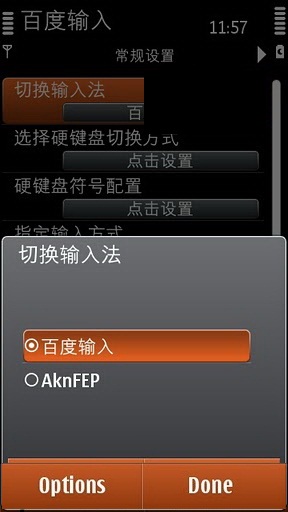
2. After installation, please REBOOT your device. This is very IMPORTANT!

3. After reboot, you can launch it from the application launcher. It’s easy to recognise it because it’s the only app with Chinese name on Nokia N8

4. The next step is to enable Baidu Input systemwide. It will be used as the main text entry method in all text areas in all applications. When you launch Baidu Input, you will be presented with a list of 8 options. Select the first one as highlighted in the screenshot (the one on the right) above.

5. A new screen will be opened. Again, please select the first item in the list where AknFEP is displayed. A pop out selection will appear. Select the one that’s written in Chinese. This method also can be used to disable Baidu Input if you dont want to use it or you want to uninstall it from your device.

6. You can now exit Baidu Input configuration. But before using it, you need to understand how it works. When you use it for the first time, the portrait QWERTY is not displayed. Instead, a Chinese keypad will be displayed to enter text. Dont worry. You can change that to QWERTY. Tap the icon (that is marked in orange – refer to screenshot above, on the left). A pop-up will appear, select the one with number 26 in the beginning, screenshot on the right.
7. After that, select another icon (also marked in orange) to change text method to English. The keypad will change to English alphanumeric. To change to QWERTY, press and slide your thumb (or finger) from left to right on any part of the keyboard. This is kinda hard to explain by text. Actually, changing text entry method in Baidu Input from alphanumeric to QWERTY vice versa is easily achieved using gestures. Left to right or right to left.

8. Here are some screenshots of the portrait QWERTY in action in different applications on Nokia N8.

9. Here’s the qwerty in landscape mode :

10. Have you tried using Baidu Input? What do you think?
Download to PC Clickshere
Alternatehere
Subscribe to:
Posts (Atom)


